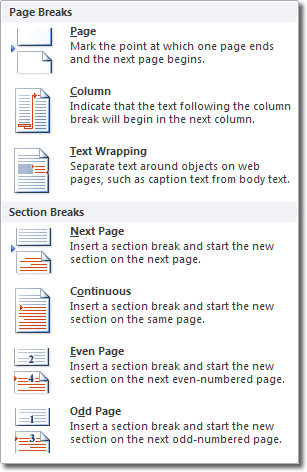
 When you start a document, there are no section breaks
because the entire document consists of one section. A section break is the
point at which you end one section and begin another because you want some
aspect of page formatting to change.
When you start a document, there are no section breaks
because the entire document consists of one section. A section break is the
point at which you end one section and begin another because you want some
aspect of page formatting to change.
Showing posts with label laptop services. Show all posts
Showing posts with label laptop services. Show all posts
Friday, April 24, 2015
HOW TO USE SECTION BREAK IN MSWORD
When you start a document, there are no section breaks
because the entire document consists of one section. A section break is the
point at which you end one section and begin another because you want some
aspect of page formatting to change. 


Wednesday, March 25, 2015
How to use a Mobile App For Election Monitoring, Developed By Nigerians For Nigerians

Friday, May 16, 2014
HOW TO BLOCK SOME WEBSITES FROM LOADING ON YOUR DEVICE
To block some certain websites on your Android device, you need an application called Hosts Editor.
Since the Hosts Editor edit the hosts file, root permission is required.
What is Hosts Editor?
Hosts Editor is a way to add, remove or comment out entries in the hosts file. The hosts file allows the user to override an IP address of a specific url.Since the Hosts Editor edit the hosts file, root permission is required.

Tuesday, May 13, 2014
HOW TO RUN ANDROID GAMES AND APP ON DESKTOP
How To Install Android Apps & Games On your Computer:
Actually for some time now I've been wondering how I could install andriod apps on my Computer or probably make use of adroid apps with my andriod connected to my pc. All I wanted was to make use of these apps dirrectly on my PC just like I would do to java application using micro Emulator Or Jar Emulator to display apps on my PC or even install them on PC.
My luck got even harder since all andriods make use of ".apk" file which you cannot use Jar emulator to display them on pc. My Search went no further as I was able to do this in no time.
Now draw closer let me whisper to your ears how you can easily install and try almost all android apps and games on your Computer without any heck using an application called BlueStacks.
Actually for some time now I've been wondering how I could install andriod apps on my Computer or probably make use of adroid apps with my andriod connected to my pc. All I wanted was to make use of these apps dirrectly on my PC just like I would do to java application using micro Emulator Or Jar Emulator to display apps on my PC or even install them on PC.
My luck got even harder since all andriods make use of ".apk" file which you cannot use Jar emulator to display them on pc. My Search went no further as I was able to do this in no time.
Now draw closer let me whisper to your ears how you can easily install and try almost all android apps and games on your Computer without any heck using an application called BlueStacks.

Tuesday, May 6, 2014
HOW TO MAKE YOUR PC A HOTSPOT FOR OTHER WIFI ENABLED DEVICES

Learn How to Start recharge card printing business today and make N10,000 weekly
Subscribe to:
Posts (Atom)

.
