Showing posts with label phones. Show all posts

Friday, January 6, 2017

How to prepare your phone before selling it

How to prepare your phone before selling it

How to prepare your phone before selling it

It is a New Year and you may probably want to replace your smartphone you have been using for several years. Beside this, you may need money to deal with an emergency. You may decide to get rid of your phone. Whatever the case maybe, you have to prepare your phone for sale so as to get the best deal from the sale. Some tips to prepare your smartphone for sale includes.

Friday, November 11, 2016

5 Ways to Take Screenshots on Your Android Phone

How to Take Screeshot with Phone

Since the arrival of smartphones, taking screenshots have become important and also made easy. You may be asked by your bank or a friend to send a screenshot of your alert as proof of payment. In other cases, you may love a picture and don’t want to download it, you can simply screenshot it. So, how do you take screenshots if you use an android phone? It is essential to note that this function may vary in different smartphones.
Use the Android Operating System

Tuesday, September 6, 2016

Reasons not to worry when you forget your Phone at Home

This is quite unthinkable for you to leave your phone at home. In is the 21st century and the era of the technology evolution where a phone is as important as the air you breath in. You can make and receive calls, access the internet and do a plethora of things with your phone. Despite this, you may inadvertently leave your phone at home. It is difficult but if it happens, we share 5 reasons not worry too much if you leave your phone at home.

No distractions

While driving, working or exercising, your phone can be a major distraction. It may ring, constantly receive social media or text notifications. And of course, you may want to catch-up with trending news on social media and your favourite website. But without your phone, you will be able to concentrate and focus.

You will be able to connect with people

For many people, phones take most of their attention. They don’t listen when they are communicating and very few people visit friends when they can simply chat. If for a day you leave your phone at home, you will no doubt have quality conversations, especially with friends and co-workers.

Enjoy your vacation

A break from work can easily be ended by a phone call. This is why some employees go incommunicado when they are on leave or vacation. So, be grateful if you forget or leave your phone at home. It is no cause for anxiety.

Peace and quiet

Phones ringing, listening to music via Bluetooth headphones and a temporary break from social media. These are the things you enjoy when you are with your phone. A day without your phone will help you experience peace and quiet of your ambience and observe what is happening around you.

You will save money on call cards

Forgetting your phone may be another way to save money in this economic recession. If you calculate the cash you spend on call cards, you will be glad you forgot your phone even though it can be very inconvenient for you.

Wednesday, August 3, 2016

Things to Note before Buying Power Bank

5 Things Nigerians Should Know Before Buying a Power Bank


Power is yet to be regular or stable in Nigeria. Hence, Nigerians are searching for alternatives to keep their phones, laptops and other devices charged. Interestingly, it seems phones are getting more

Tuesday, July 12, 2016

Why Kids Don’t Need Smartphones


Nearly everyone uses a smartphone now including kids. Yes, kids. Kids are smarter and brighter now, that they have little or no difficulty navigating handheld devices. Even parents will be surprised by their knowledge. Of course, you cannot prevent this because we are in the digital age. However, few people fail to consider the side effects smartphones have on these kids. Remember, unlike in the past, children of today grow up early and are exposed to all sorts of things. W therefore share with you 6 things you should consider before buying a smartphone for kids.

Facebooking instead of reading books

For many kids who own smartphones, their new book is

Friday, July 1, 2016

5 Ultimate Tech Packing Checklist For Travellers

1 (1) 
5 Ultimate Tech Packing Checklist For Travellers
Technology can also ease travelling especially when you pack the right gadgets. It is important for you to pack the correct tech gadgets so that you do not spend money on buying them. This is one-way budget travellers can save money.
Power bank
For persons who cannot do without their phone, a power bank will always come in handy. On a long distance trip, you may run out of battery but with

Sunday, June 26, 2016

Free Call for Life - Nigerian 5th Mobile Netwotk - Ntel

Ntel, which is now the 5th Mobile network operator in Nigeria, said the commencement of operations is the culmination of its journey from acquiring the old NiTel/MTel assets

Read: Get the cheapest Data Plan For your Phone

Ntel, the revamped version of defunct national carrier NITEL, has announced the commencement of

Tuesday, March 10, 2015

How to Keep Your Android Device Screen Safe - Phones

Nowadays, smartphones and tablets come with the toughest and most scratch-resistant touch screen panels, thanks to such materials like Corning Gorilla Glass. It takes a lot to break and damage them. This, on the other hand, is not impossible if you behave recklessly with your Android device. Here are our tips on how to protect your Android touch screen.

1. Choose your tool wisely!

Wednesday, February 11, 2015

Latest on Galaxy S6 : To have metal body and 5.1-inch display


Samsung Galaxy S6 will have all metal body and 5 1 inch display

Fresh reports From Samsung desk have confirmed the Samsung Galaxy S6 will sport an all metal body and a 5.1-inch display.

Thursday, October 24, 2013

Ex-Apple CEO reportedly mulling bid to rescue BlackBerry

We've seen a steady stream of potential suitors for BlackBerry in recent months, but unnamed sources are now claiming ex-Apple CEO John Sculley is looking into taking control of the company. The Globe and Mail reports that Sculley, who famously helped oust Steve Jobs from Apple in the '80s, working with partners in "exploring a joint bid" for the troubled Canadian smartphone maker.

Friday, October 11, 2013

New Smartphones with Best Cameras

With a host of smartphones being sold today, it may be difficult to differentiate between them and find too drastic differences in what they do. After all, most of their functionality is based on apps, and they are the same for all phones using the same platform. However, apart from some other hardware related features, one of the things that can still significantly differ from one phone to the next is the camera that it sports. Even though there are still people who will only occasionally snap a photo with their phone, a large majority of smartphone users take photos practically on daily bases. However, the phones that we are presenting today are not exactly ideal for causal photographers, instead they would be better suited for people who really need to take high quality pictures and are prepared to pay the price.

Thursday, September 26, 2013

How to Restore iPhone / iPad Without Losing Jailbreak

With iOS 7 already released, restoring an iPhone, iPad or iPod Touch may be risky since you’re likely to lose your iOS 6 jailbreak and be forced to upgrade to iOS 7 (which everyone doubts would see a jailbreak anytime soon). Normally, if you restore a jailbroken Apple device, you lose everything including your jailbreak.

Monday, September 23, 2013

HOW TO INSTALL BLACKBERY MESSENGER (BBM) IN YOUR ANDROID PHONE


you can now enjoy BBM service in your Android phones like a blackberry users. with bbm, you may not need to share email or phone numbers to anybody if you don't wish to. You can easily share a broadcast message to all your contacts and know when your contact read your message.
Get the BBM APK HERE, or download HERE

Saturday, September 14, 2013

AIRTEL NEW BLACKBERRY ACTIVATION PLANS AND ACTIVATION CODES

BB Unlimited 

Monthly              
  1. Data Allowance (MB) : Unlimited             
  2. Retail Price (N) : 1,500   
  3. Validity Period : 30  days       
  4. USSD Activation Code : *440*16#            
  5. SMS Activation Code : bbum
 

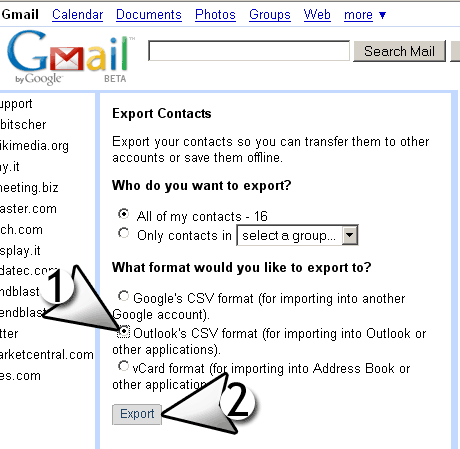
How to Export your Gmail contacts


Export your Gmail contact by just following these steps:
  1. Sign in to Gmail.
  2. Click Gmail at the top-left corner of your Gmail page, then choose Contacts.
  3. From the More drop-down menu, select Export....
  4. Choose whether to export all contacts or only one group.
  5. Select the format in which you'd like to export your contacts' information. Please note, some of these formats can lose some contact information.

How to Sync contacts with your iOS device


Follow these steps to Synchronize your gmail contacts with your device:

    1. Open the Settings application on your device.
    2. Select Mail, Contacts, Calendars.
    3. Select Add Account...
    4. Select Other
    5. Select Add CardDAV Account
    6. Fill out your account information in the following fields:

Saturday, August 24, 2013

Nokia says India ‘least favourite market’


Finnish telecom giant Nokia has told India’s government that the country is now its “least favourable market” to operate in and it makes better sense to export its products from China, a report said Friday.

Nokia, which is fighting a 20-billion rupee ($311 million) tax demand from Indian authorities, urged the government to “act quickly to correct the wrong perception of India as a place for business”, The Indian Express newspaper reported.

Tuesday, July 16, 2013

Microsoft and Blackberry cut Surface and Z10 prices


Microsoft and Blackberry have both cut prices on their flagship products in a bid to boost sales.
Microsoft dropped the price of the 32GB Surface RT to £279 from £400 in the UK, with the 64GB model's price down by the same amount to £359.

Thursday, July 4, 2013

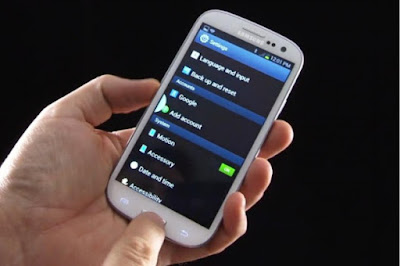
How to use your android mobile phone as a modem

In this post, i"m Going to show you how you can use your Galaxy note android as a modem on your laptops.  You can tap from your internet subscription and browse with it on your laptop. just follow this steps:
Below are the steps:
Using it as a WiFi router.
  1. In your android smart phone, go to Settings -> Wireless and Network Settings -> Mobile networks and select the “Use packet data” option. Also uncheck the “Use only 2G Networks” option
  2. Again go to Settings ->Wireless and Network Settings->Tethering and portable hotspots
  3. Select the second option “Mobile AP”. You should see a blue wifi icon in your cellphone notification bar

Wednesday, June 26, 2013

HOW TO SHARE YOUR MTN DATA PLAN


What is MTN Data Share

MTN Data share Is one of the features recently Lunched by MTN that enables Subscribers to share His/Her internet subscriptions with friends and family on the same MTN Network no matter their location nor  the package in which there are.
 
To get started, simply:
  • Activate an applicable data plan from the table below.
  • Dial *131*2*1# or text REG to 131; to register for MTN Data Share, you will receive a unique security PIN
  • You are required to change the system generated PIN to a new PIN they can easily remember by dialling*131*2*5# or by texting Change OLD_PIN NEW_PIN NEW_PIN to 131. E.g Change 0000 1234 to 131. Where 0000 is old PIN and 1234 is your new PIN.
Related Posts Plugin for WordPress, Blogger...

.